

Active users
The Active users tab is the default view of the Users section. It shows a table of every active user in your organization — the people who can receive surveys and the members who have access to the platform. From here you can search, sort, filter, and manage each user individually.
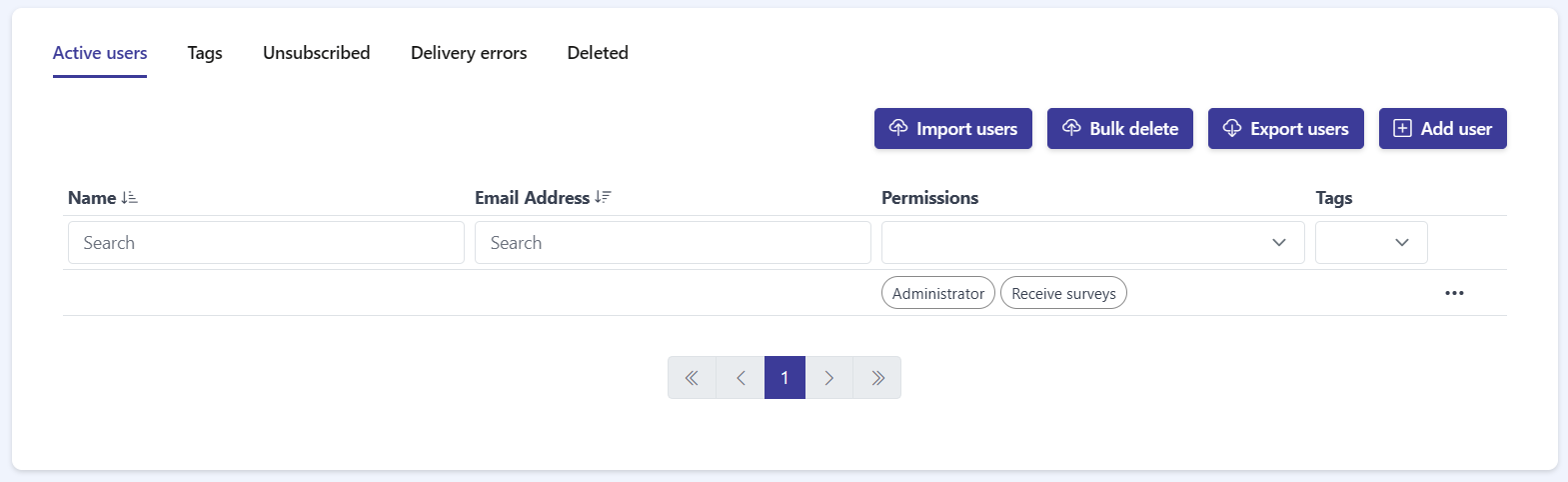
Table columns
Section titled “Table columns”The table has four columns:
- Name — the user’s full name.
- Email Address — the email address used to send surveys and notifications.
- Permissions — the roles assigned to the user, shown as badges such as Administrator and Receive surveys. A user can have one or both.
- Tags — the labels assigned to the user.
Search and filter
Section titled “Search and filter”You can narrow the list using the controls at the top of the table:
- Sort — the Name and Email Address column headers each have a sort control. Click it to order the list in ascending or descending order.
- Search — below the Name and Email Address headers there is a Search text box. Type in it to filter by that column.
- Filter — the Permissions and Tags columns have dropdown filters. Open a dropdown and select a value to show only the matching users.

Per-user actions
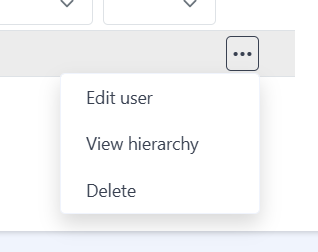
Section titled “Per-user actions”Each row has a ··· actions menu on the right. Click it to open three options:
- Edit user — open the user’s profile, where you can update their name, email address, and permissions.
- View hierarchy — view the user’s position within your organization’s structure.
- Delete — remove the user from the organization.
Pagination
Section titled “Pagination”If your organization has many users, the table is split across several pages. Use the pagination control at the bottom of the table to move between pages.
Frequently asked questions
How do I filter active users by role or tag?
Use the dropdown filters on the Permissions and Tags columns.
What actions are available for each user?
Edit user, View hierarchy, and Delete, from the ··· menu on the user's row.
What columns does the active users table show?
Name, Email Address, Permissions, and Tags.