

Recent
Recent is the default tab of the Surveys page. It lists your organization’s current surveys — every survey that has not been archived.
What each row shows
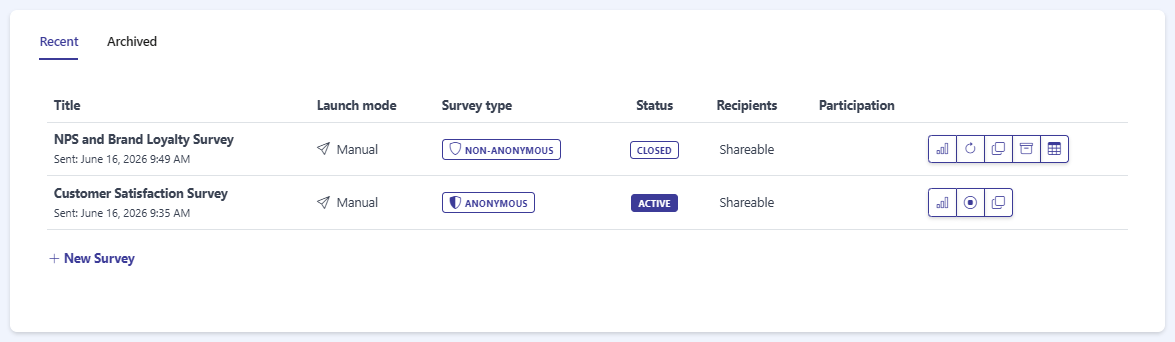
Section titled “What each row shows”Each survey appears as a row showing its Title with the date it was sent underneath (for example, Sent: June 16, 2026 9:49 AM), its Launch mode, its Survey type (Anonymous or Non-anonymous), its Status (Active, Closed, or Draft), its Recipients, and its Participation. Surveys with different statuses can appear together in the same list. For a full description of each column, see the Surveys overview.
Actions and details
Section titled “Actions and details”On the right of each row is a set of action buttons. Which buttons appear depends on the survey’s Status, so two surveys in the list can show different buttons. See Survey actions for what each button does.
Click a survey’s Title to open its detail and results view. See Survey details for more.
Starting a new survey
Section titled “Starting a new survey”At the bottom of the list, the + New Survey link starts a new survey.
Frequently asked questions
What does the Recent tab show?
Your organization's current, non-archived surveys. It is the default tab of the Surveys page.
Can surveys with different statuses appear together?
Yes. Active, Closed, and Draft surveys can all appear in the same list, each with its own action buttons.
What is the New Survey link for?
It starts a new survey from the bottom of the list.