

Archived
Archived is the second tab of the Surveys page. Archiving lets you move a survey out of your Recent list to keep it tidy, without deleting the survey — its results stay available, and you can bring it back at any time.
A survey arrives here through the Archive action, which is available on a closed survey. See Survey actions for how to archive a survey.
Columns
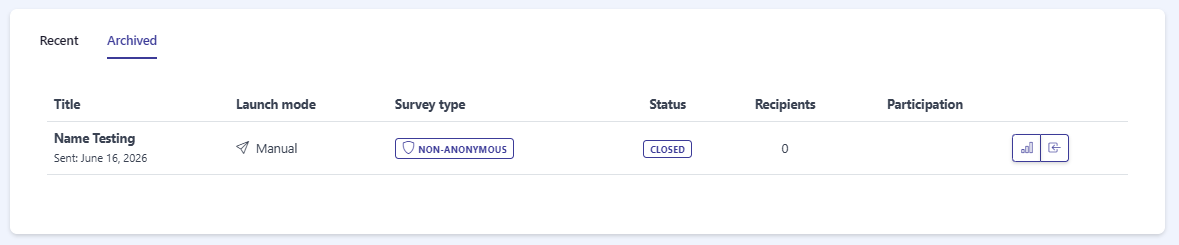
Section titled “Columns”Archived surveys are shown in a table with the same columns as the Recent tab: Title (with its sent date underneath), Launch mode, Survey type, Status, Recipients, and Participation. For a full description of each column, see the Surveys overview.
Actions
Section titled “Actions”Each archived survey row has two action buttons:
- View Results — opens the survey’s detail and results view. See Survey details for more.
- Move to Recent Surveys — unarchives the survey and sends it back to the Recent tab.

Empty state
Section titled “Empty state”When you have no archived surveys, the tab shows an empty state with the message There’s nothing here yet….
Frequently asked questions
What is the Archived tab for?
It keeps surveys you no longer need out of your Recent list, without deleting them. Archived surveys stay available and can be moved back at any time.
How does a survey get archived?
Use the Archive action on a closed survey. See the Survey actions page.
Can I unarchive a survey?
Yes. Use Move to Recent Surveys on the archived row to send it back to the Recent tab.